
Understanding OpenID Connect Scopes in Amazon Cognito for .NET Applications
Learn how to use OpenID Connect scopes with Amazon Cognito to access user profile information. We'll explore standard scopes like email, phone, and profile, and see how to retrieve these claims from JWT tokens in ASP.NET applications.
OpenID Connect scopes allow you to request specific sets of user information when authenticating with Amazon Cognito.
Rather than getting all user attributes by default, scopes give you control over exactly which claims are included in your JWT tokens.
In this post, let's explore:
- What OpenID Connect scopes are and how they work
- How to configure scopes in Amazon Cognito
- How to retrieve user information from scopes in .NET applications
- When to use the UserInfo endpoint vs. token claims
Thanks to AWS for sponsoring this article in my .NET on AWS Series.
What Are OpenID Connect Scopes?
OpenID Connect is an identity layer built on top of the OAuth 2.0 framework. It verifies the identity of an end user and obtains basic user profile information.
In OAuth 2.0, a scope is a string that represents the level of access a client requires. While OAuth focuses on authorization and resource access, OpenID Connect extends this with the concept of claims - pieces of information about the authenticated user.
A scope in OpenID Connect is essentially a grouping of claims. Instead of requesting individual attributes, you request a scope, and that scope includes multiple related claims.
Standard OpenID Connect Scopes
The OpenID Connect specification defines several standard scopes:
- openid - Required for OpenID Connect, includes the
sub(subject) claim - email - Includes
emailandemail_verifiedclaims - phone - Includes
phone_numberandphone_number_verifiedclaims - profile - Includes name, family_name, given_name, middle_name, nickname, preferred_username, profile, picture, website, gender, birthdate, zoneinfo, locale, and updated_at
- address - Includes the
addressclaim with formatted address information
Configuring Amazon Congnito User Pool Attributes
When creating an Amazon Cognito user pool, you specify which attributes you want to collect from users during sign-up.
These are defined during user pool creation and cannot be changed later. If you need to capture additional attributes, you'll need to create a new user pool.
Let's look at two user pools with different configurations:
Enabling Scopes for App Clients
Even though user attributes are stored in the user pool, you must explicitly enable which scopes each app client can request.
Navigate to your user pool → App clients → Select your app client → Login pages.
Under Managed login pages configuration, you'll see the OpenID Connect scopes currently enabled.
By default, you might see: openid, email and phone. Click edit and add the profile scope.
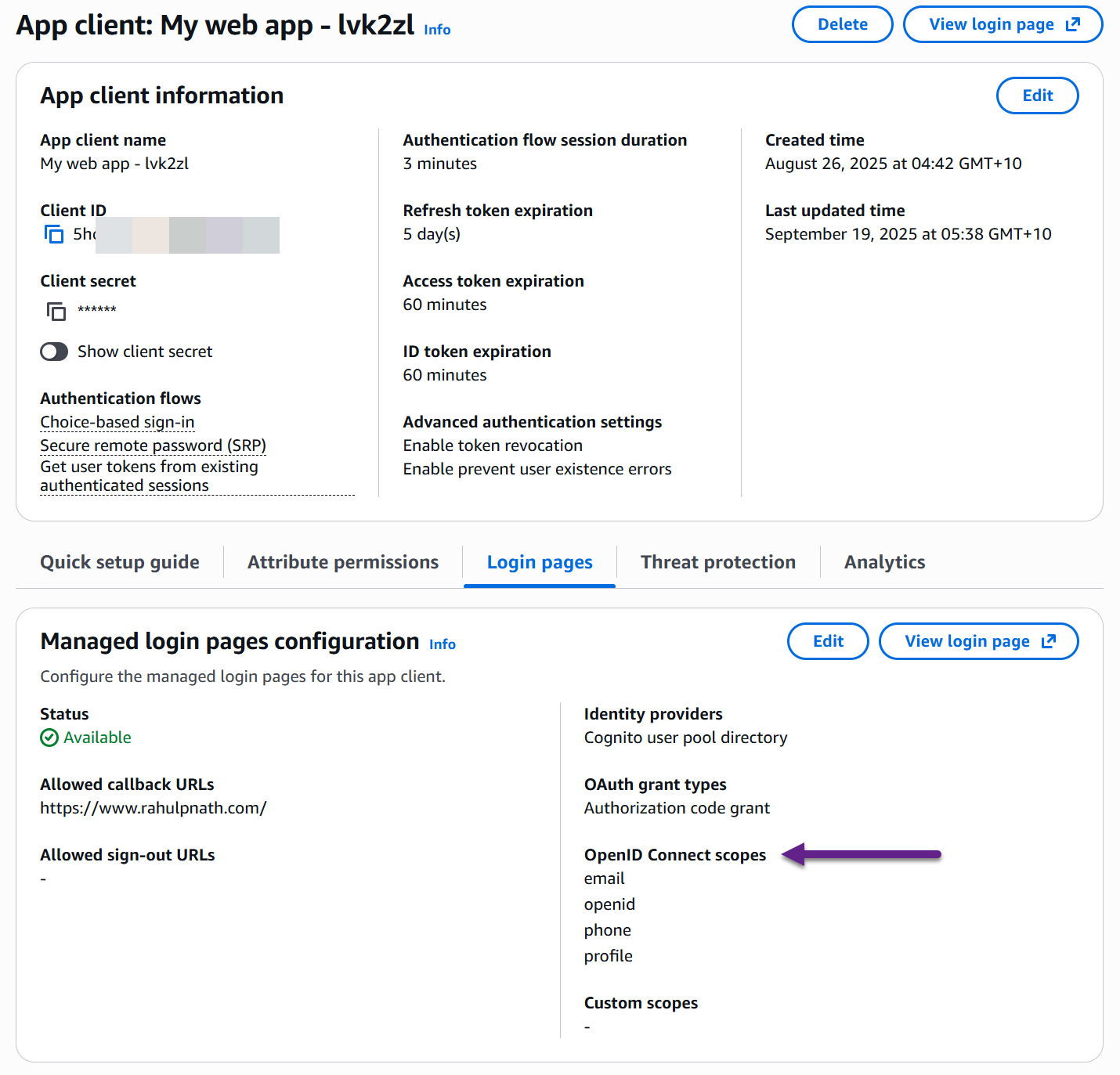
Now the app client can request the profile scope during authentication.
Requesting Scopes During Login
When using the Cognito Hosted UI to authenticate, scopes are specified as a query parameter in the authorization URL.
The URL format looks like this:
https://your-domain.auth.region.amazoncognito.com/oauth2/authorize?response_type=code&client_id=YOUR_CLIENT_ID&redirect_uri=YOUR_REDIRECT_URI&scope=openid+email+phone+profile
The scope parameter is a space-separated (or + separated in URLs) list of the scopes you want to request.
Without the profile scope, the ID token contains only basic claims (sub, email, phone), but adding it includes additional profile claims like name, birthdate, and locale.
ID Token vs. Access Token
If you inspect the access token from the same authentication flow, you'll see it doesn't contain profile claims like name or birthdate.
Profile information appears in the ID token, not the access token.
The access token contains a scope field that shows which scopes were granted, but the actual claims are in the ID token.
Implementing Policy-Based Authorization with User Attributes
Now let's see how to use user profile information in an ASP.NET application for policy-based authorization.
Policy Based Authorization in ASP.NET Core - Building Blocks
Let's implement an authorization policy that restricts API access based on the user's age. Only users over 18 should be able to access certain endpoints.
First, define an authorization requirement:
public class AgeRequirement : IAuthorizationRequirement{public int MinimumAge { get; }public AgeRequirement(int minimumAge){MinimumAge = minimumAge;}}
Using the Amazon Cognito UserInfo Endpoint
Now to implement a requirement handler for this requirement we need the user's birthdate to calculate the age.
Amazon Cognito provides a UserInfo endpoint that you can call with a valid access token to retrieve user attributes.
The endpoint is located at:
https://your-domain.auth.region.amazoncognito.com/oauth2/userInfo
You can call this endpoint with a GET request, passing the access token in the Authorization header and the response returns all the user information for the scopes that were requested during authentication:
{"sub": "user-id-here","email": "user@example.com","email_verified": true,"phone_number": "+1234567890","phone_number_verified": false,"name": "John Doe","birthdate": "2009-05-01","locale": "en-US"}
This is the same information available in the ID token, but accessed via API call instead.
We can use this to implement our policy requirement handler that retrieves the birthdate from the UserInfo endpoint and calculates the age as shown below.
public class AgeRequirementHandler : AuthorizationHandler<AgeRequirement>{private readonly IHttpClientFactory _httpClientFactory;private readonly IConfiguration _configuration;protected override async Task HandleRequirementAsync(AuthorizationHandlerContext context,AgeRequirement requirement){var httpContext = context.Resource as DefaultHttpContext;if (httpContext == null)return;var birthdate = await GetUserBirthdateAsync(httpContext);if (birthdate == null)return;var age = CalculateAge(birthdate.Value, DateTime.UtcNow.Date);if (age >= requirement.MinimumAge){context.Succeed(requirement);}}private async Task<DateTime?> GetUserBirthdateAsync(HttpContext httpContext){var authorizationHeader = httpContext.Request.Headers["Authorization"].ToString();if (string.IsNullOrWhiteSpace(authorizationHeader))return null;var userInfoEndpoint =$"{_configuration["JwtBearer:UserPoolDomain"]}/oauth2/userInfo";var client = _httpClientFactory.CreateClient();client.DefaultRequestHeaders.TryAddWithoutValidation("Authorization", authorizationHeader);try{var userInfo = await client.GetFromJsonAsync<CognitoUserInfo>(userInfoEndpoint);if (userInfo?.Birthdate == null)return null;if (DateTime.TryParse(userInfo.Birthdate, out var dob))return dob;}catch{// Log error if needed}return null;}private int CalculateAge(DateTime dob, DateTime today){var age = today.Year - dob.Year;if (dob.Date > today.AddYears(-age))age--;return age;}}
Register the policy, handler, and HTTP client in Program.cs:
builder.Services.AddAuthorization(options =>{options.AddPolicy("Over18", policy =>{policy.RequireAuthenticatedUser();policy.Requirements.Add(new AgeRequirement(18));});});builder.Services.AddHttpClient();builder.Services.AddSingleton<IAuthorizationHandler, AgeRequirementHandler>();
Apply the policy to your endpoints using the [Authorize(Policy = "Over18")] attribute.
When a request comes in, the handler calls the Cognito UserInfo endpoint with the access token to retrieve the user's birthdate, calculates their age, and either allows (200 OK) or denies (403 Forbidden) access based on the minimum age requirement.
Performance Considerations
The current implementation makes a UserInfo API call on every request. This happens because profile claims aren't included in the access token by default.
For better performance, you can configure Cognito to include custom claims directly in the access token using Lambda triggers. This eliminates the need for the UserInfo endpoint call.
We'll explore how to add custom claims to Cognito tokens in a future post in this series.
Adding Custom Attributes to Amazon Cognito User Pools for .NET Applications
👉 Full source code available here